
Chromebook vs Laptop: Which One Should You Buy in 2026?
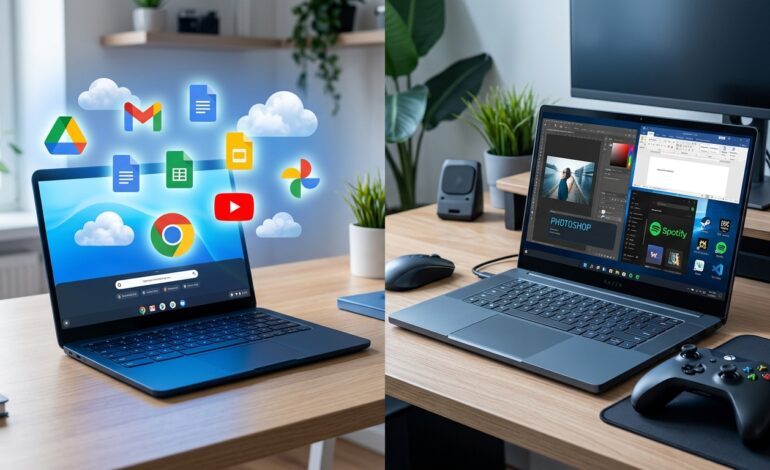
When shopping for a new computer, one of the most common questions people ask is: Chromebook vs Laptop – which one is better?
At first glance, both devices may look similar. They have screens, keyboards, touchpads, and can be used for work, study, entertainment, and browsing the internet. However, the real difference lies in what’s inside and how they are designed to work.
In recent years, Chromebooks have become increasingly popular among students, remote workers, and casual users. Meanwhile, traditional laptops continue to dominate the market for professionals, gamers, and power users.
If you’re confused about whether to buy a Chromebook or a laptop, this detailed guide will help you understand the differences, advantages, disadvantages, and the best use cases for each device.
What Is a Chromebook?
A Chromebook is a lightweight computer that runs on ChromeOS, an operating system developed by Google.
Unlike traditional laptops that use Windows or macOS, Chromebooks are designed primarily for cloud-based computing. Most tasks are performed through web applications and online services.
Chromebooks are known for:
- Fast startup times
- Long battery life
- Simple user experience
- Affordable pricing
- Strong security features
Popular Chromebook manufacturers include Acer, ASUS, HP, Lenovo, and Samsung.
What Is a Laptop?
A laptop is a portable computer that typically runs on operating systems such as:
- Windows
- macOS
- Linux
Traditional laptops are built to handle a wide range of tasks, from web browsing and office work to gaming, programming, video editing, and graphic design.
Because of their flexibility and power, laptops remain the preferred choice for professionals and advanced users.
Chromebook vs Laptop: Key Differences
1. Operating System
The biggest difference between a Chromebook and a laptop is the operating system.
Chromebook:
- Uses ChromeOS
- Designed around the Google ecosystem
- Relies heavily on internet-based applications
Laptop:
- Uses Windows, macOS, or Linux
- Supports a wider range of software
- Works efficiently both online and offline
If you already use Google services like Gmail, Google Drive, Google Docs, and Google Meet, a Chromebook may feel very familiar.
However, if you need specialized software, a traditional laptop is often the better choice.
2. Performance
When comparing Chromebook vs Laptop performance, the answer depends on your needs.
Chromebooks are optimized for:
- Web browsing
- Online classes
- Office documents
- Video streaming
- Email communication
Laptops are better for:
- Video editing
- Graphic design
- Software development
- Gaming
- Data analysis
- Professional workloads
A high-end laptop can easily outperform most Chromebooks when running demanding applications.
3. Software Compatibility
Software support is where traditional laptops have a major advantage.
Chromebook Software
Chromebooks support:
- Chrome browser extensions
- Android applications
- Progressive Web Apps (PWAs)
However, some desktop applications are unavailable or limited.
Laptop Software
Laptops support:
- Microsoft Office
- Adobe Photoshop
- Premiere Pro
- AutoCAD
- Visual Studio
- Professional accounting software
- Most business applications
If your work depends on specific software, always check compatibility before choosing a Chromebook.
4. Battery Life
Battery life is one area where Chromebooks often shine.
Many Chromebooks offer:
- 8 to 15 hours of battery life
- Efficient power consumption
- Minimal background processes
While modern laptops also provide excellent battery performance, powerful hardware often consumes more energy.
For students and travelers, Chromebook battery life can be a significant advantage.
5. Storage
Another important factor in the Chromebook vs Laptop debate is storage.
Chromebook Storage
Most Chromebooks come with:
- 32GB to 256GB SSD storage
- Cloud storage integration
- Google Drive support
Laptop Storage
Most laptops offer:
- 256GB to 2TB storage
- Expandable options
- Better support for large files
If you regularly work with videos, photos, or large software installations, laptops provide more flexibility.
6. Security
Security is one of ChromeOS’s strongest features.
Chromebooks include:
- Automatic updates
- Sandboxed applications
- Verified boot process
- Built-in malware protection
Traditional laptops can also be secure, but users often need additional antivirus software and regular maintenance.
For beginners, Chromebooks are generally easier to keep secure.
7. Gaming
Gamers should pay close attention here.
Chromebook Gaming
Chromebooks can handle:
- Browser games
- Android games
- Cloud gaming services
However, they are not designed for high-end gaming.
Laptop Gaming
Gaming laptops support:
- AAA titles
- High graphics settings
- Dedicated GPUs
- Competitive esports games
If gaming is a priority, a laptop is the obvious winner.
8. Price Comparison
Price is often the deciding factor.
Chromebook Pricing
Most Chromebooks range from:
- $200 to $600
They deliver excellent value for basic tasks.
Laptop Pricing
Laptops range from:
- $300 to over $3,000
The price varies depending on hardware, features, and intended use.
For budget-conscious buyers, Chromebooks often provide more value per dollar.
Chromebook Pros
Let’s summarize the biggest advantages of Chromebooks.
Advantages
- Affordable pricing
- Excellent battery life
- Fast boot times
- Strong security
- Easy to use
- Lightweight design
- Ideal for students
Chromebook Cons
Disadvantages
- Limited offline functionality
- Less software compatibility
- Not suitable for professional creative work
- Limited gaming capabilities
- Smaller local storage
Laptop Pros
Traditional laptops offer several major benefits.
Advantages
- More powerful hardware
- Wider software support
- Better multitasking
- Suitable for professional work
- Excellent gaming options
- Greater storage capacity
Laptop Cons
Disadvantages
- Higher cost
- More maintenance required
- Can be heavier
- Battery life varies significantly
Chromebook vs Laptop for Students
Students are among the biggest Chromebook users today.
A Chromebook is perfect for:
- Research
- Online learning
- Writing assignments
- Video conferencing
- Google Classroom
Because of their affordability and simplicity, many schools recommend Chromebooks.
However, students studying graphic design, engineering, architecture, or computer science may benefit more from a traditional laptop.
Chromebook vs Laptop for Business Users
Business users need reliable performance and productivity tools.
Choose a Chromebook if you:
- Work mostly online
- Use Google Workspace
- Need basic office functionality
Choose a laptop if you:
- Use specialized business software
- Need advanced multitasking
- Work with large datasets
- Manage complex workflows
Chromebook vs Laptop for Content Creators
Content creators generally require more computing power.
For:
- Video editing
- Graphic design
- Animation
- Music production
A laptop is usually the better investment.
Most creative software suites are optimized for Windows or macOS rather than ChromeOS.
Chromebook vs Laptop for Remote Work
Remote workers often ask which device offers the best value.
A Chromebook can easily handle:
- Zoom meetings
- Slack communication
- Email management
- Document editing
- Cloud collaboration
But professionals who use advanced software should consider a traditional laptop.
Who Should Buy a Chromebook?
A Chromebook is ideal for:
- Students
- Casual users
- Travelers
- Seniors
- Remote workers using web apps
- Budget-conscious buyers
If your daily activities revolve around the internet, a Chromebook can save money while providing excellent performance.
Who Should Buy a Laptop?
A laptop is best for:
- Gamers
- Programmers
- Designers
- Engineers
- Video editors
- Business professionals
- Power users
If you need flexibility and performance, a traditional laptop remains the strongest option.
Final Verdict: Chromebook vs Laptop
So, who wins the Chromebook vs Laptop battle?
The answer depends entirely on your needs.
A Chromebook is an affordable, secure, and user-friendly device that works exceptionally well for web-based tasks, education, and everyday productivity.
A traditional laptop offers greater power, flexibility, software compatibility, and long-term versatility for demanding users.
If your work happens mostly online and you want a budget-friendly device, choose a Chromebook.
If you require professional software, gaming capabilities, or advanced performance, invest in a laptop.
Ultimately, both devices have their strengths. The smartest choice is the one that matches your daily workflow, budget, and future requirements.
At CripsyWire, we recommend evaluating how you use technology before making a purchase decision. A well-informed choice today can save you money and improve your productivity for years to come.